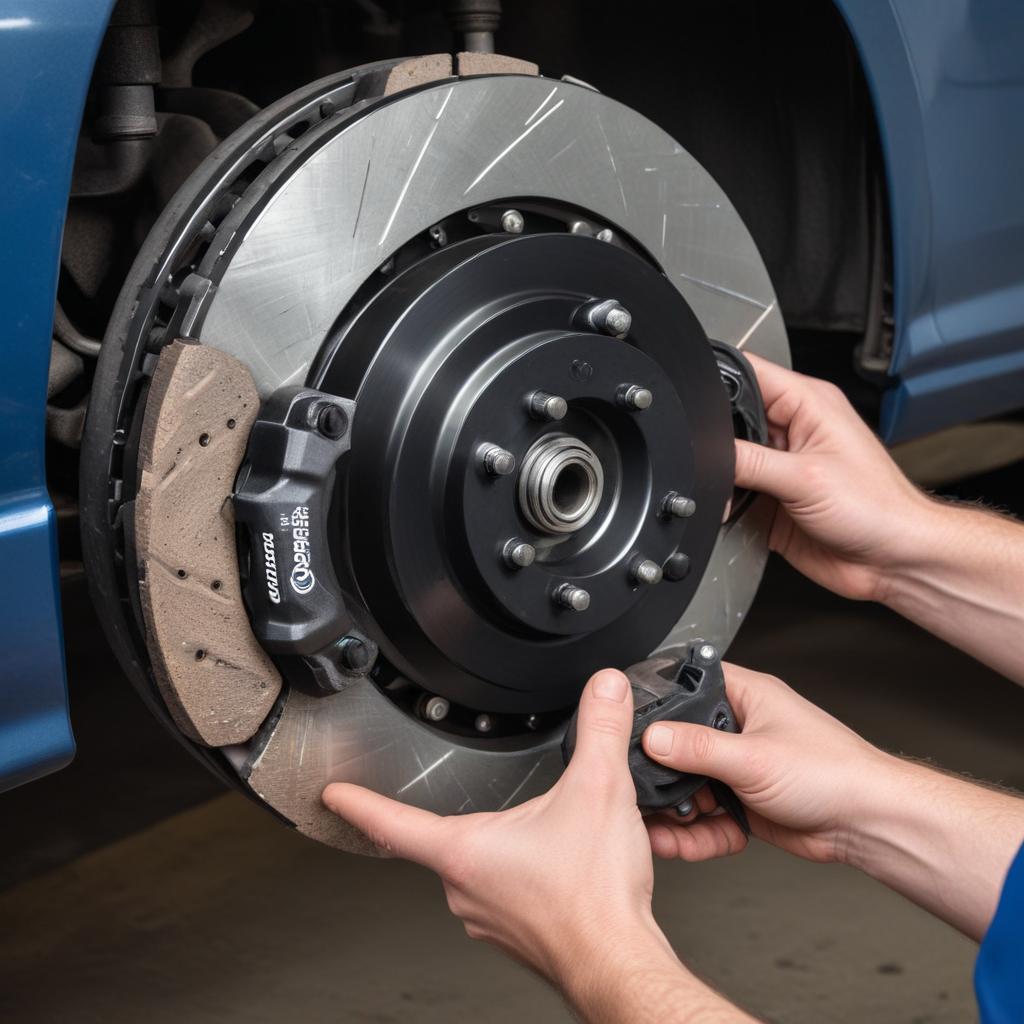
DIY Ford Brake Pad Replacement Guide: Save Money and Master Your Maintenance
Ever notice that squealing sound when you pull into your driveway, or feel your brake pedal pulsing under your foot? Those are your Ford’s way of saying, “Hey, time for new brake pads!” Whether you’re driving a trusty F-150 or a spirited Mustang GT, knowing how to replace your own brake pads can save you hundreds of dollars and give you serious bragging rights at the next car meet.
Why Ford Owners Should Learn Basic Brake Maintenance
Ford builds some of America’s hardest-working vehicles, from full-size trucks that haul heavy loads to sports cars that tear up the track. But even the most dependable engineering needs regular maintenance, and brake pads are one of the most frequent replacements you’ll face.
Learning to swap your own pads isn’t just about saving cash. It’s about understanding your vehicle, catching problems early, and having confidence that the job was done right. Plus, there’s something satisfying about getting your hands dirty and knowing you kept your Ford running safely.
When Do Ford Brake Pads Need Replacing?
Most brake pads last between 25,000 and 70,000 miles, but this varies wildly based on your driving style and conditions. Here’s what to watch for:
- Squealing or grinding noises when braking (metal-on-metal means you’ve waited too long)
- Vibration or pulsing in the brake pedal
- Longer stopping distances than usual
- Warning light on your dashboard (some newer Fords have sensors)
- Visual inspection shows less than 1/4 inch of pad material remaining
The Ford F-Series has been America’s best-selling truck for over 40 years, which means millions of owners face brake maintenance regularly!
“Regular brake inspection isn’t optional—it’s essential. Ford engineers design robust braking systems, but brake pads are wear items by nature. Checking them every 10,000 miles keeps you ahead of problems.”
Tools and Parts You’ll Need
Before diving in, gather everything you need. Nothing’s worse than having your truck on jack stands and realizing you’re missing a critical tool.
Essential Tools:
- Jack and jack stands (never rely on just a jack)
- Lug wrench or impact wrench
- C-clamp or brake caliper tool (for compressing pistons)
- Socket set (typically 13mm–19mm for most Fords)
- Brake cleaner spray
- Turkey baster (for removing old brake fluid)
- Torque wrench (proper torque prevents issues)
Parts Needed:
- New brake pads (always replace both sides of an axle)
- Brake fluid (DOT 3 or DOT 4, check your manual)
- Anti-seize lubricant (for caliper slide pins)
- Optional: new rotors if yours are warped or worn
Step-by-Step Ford Brake Pad Replacement
Now here’s the fun part—actually doing the work. This guide covers most Ford models, including the F-150, Explorer, Mustang, and Edge. Always consult your specific owner’s manual for torque specifications and any model-specific details.
Step 1: Safety First and Prep Work
Park on level ground and engage the parking brake (or chock the rear wheels if working on rear brakes). Always obey safety protocols when working under vehicles.
Loosen your lug nuts slightly before jacking up the vehicle—it’s much easier while the wheel is still on the ground. Then jack up the vehicle and secure it with jack stands. Remove the wheel completely.
Pro tip: Take photos with your phone before disassembling anything. You’ll thank yourself later when reassembling!
Step 2: Remove the Caliper
Locate the caliper—that’s the metal clamp squeezing your brake rotor. You’ll see two bolts (usually on the back) holding it in place.
- Remove the lower caliper bolt first (often 13mm or 14mm)
- Swing the caliper up like opening a book
- If replacing both pins, remove the upper bolt too and take the caliper completely off
- Never let the caliper hang by the brake line—use a wire hanger or bungee cord to support it
Spray everything with brake cleaner. You’ll see tons of black brake dust—that stuff is nasty and you don’t want to breathe it.
Step 3: Inspect and Remove Old Pads
The old brake pads should slide right out once the caliper is moved. Check your rotors for grooves, scoring, or warping. Run your finger across the surface—it should be smooth. If you feel significant grooves or see deep scratches, consider replacing the rotors too.
Measure the rotor thickness with calipers if you have them. Most Ford rotors have a minimum thickness stamped on them. Below that number? Time for new ones.
Step 4: Compress the Caliper Piston
Here’s where the C-clamp comes in. The piston (the circular piece inside the caliper) needs to compress back into its bore to make room for new, thicker pads.
Place the C-clamp against the piston and the back of the caliper, then slowly tighten. You’ll see brake fluid being pushed back into the master cylinder—this is why you removed some fluid earlier. Take your time with this step.
Step 5: Install New Brake Pads
Check which pad goes where—one usually has a wear indicator (a small metal tab that squeals when the pad gets thin). That one typically goes on the inside.
- Apply a thin layer of anti-seize lubricant to the caliper slide pins
- Insert the new pads into the caliper bracket
- Swing the caliper back down over the pads
- Thread in the caliper bolts and torque to spec (usually 25-35 ft-lbs for most Fords)
Some brake pads come with shims or clips—install these exactly as they came on the old pads.
Step 6: Reassemble and Test
Put your wheel back on and hand-tighten the lug nuts in a star pattern. Lower the vehicle and torque the lug nuts properly (typically 100-150 ft-lbs depending on your Ford model—check your manual).
Before driving anywhere: Pump your brake pedal several times until it feels firm. You’re rebuilding pressure in the system. Check your brake fluid reservoir and top it off if needed.
Ford Brake System Comparison Across Popular Models
| Model | Brake Type (Front/Rear) | Rotor Size (Front) | Pad Life Expectancy | Starting Price |
|---|---|---|---|---|
| Ford F-150 | Disc/Disc | 13.0-14.0 inches | 30,000-50,000 miles | $36,000 |
| Ford Mustang GT | Disc/Disc | 13.9 inches | 25,000-40,000 miles | $42,000 |
| Ford Explorer | Disc/Disc | 12.4 inches | 35,000-60,000 miles | $39,000 |
| Ford Escape | Disc/Disc | 11.8 inches | 40,000-70,000 miles | $30,000 |
| Ford Ranger | Disc/Disc | 12.2 inches | 35,000-55,000 miles | $32,000 |
Ford Brake Pad Lifespan by Driving Condition
Breaking In Your New Brake Pads
Don’t just slam on the brakes after installation. New pads need a proper break-in period to transfer material onto the rotors and achieve optimal performance.
For the first 200-300 miles:
- Avoid heavy braking when possible
- Make 30-40 gradual stops from 30-40 mph
- Let the brakes cool between hard stops
- Avoid sitting at lights with your foot on the brake (use the parking brake instead)
This bedding process creates an even layer of pad material on the rotor surface, improving stopping power and reducing noise.
Common Mistakes to Avoid
Even experienced DIYers make these errors. Learn from others’ mistakes:
Not compressing the piston properly leads to binding calipers and uneven pad wear. Take your time with the C-clamp.
Forgetting to pump the brake pedal before driving can result in a terrifying first stop with no brakes. Always pump until firm!
Mixing old and new pads on the same axle causes uneven braking. Replace both sides together, always.
Skipping the caliper slide pins causes one pad to wear faster. Clean and lubricate those pins!
Over-torquing caliper bolts can strip threads or crack the caliper. Use a torque wrench and follow specs.
Frequently Asked Questions
How long does a DIY brake pad replacement take?
For your first time, plan on 2-3 hours for both front wheels. Once you’ve done it a few times, you can knock it out in under an hour per axle. Rear brakes sometimes take longer because of parking brake mechanisms.
Can I replace just one brake pad if only one is worn?
No, always replace brake pads in pairs on the same axle. Mismatched pads cause uneven braking forces, which can pull your vehicle to one side and create dangerous driving conditions.
Do I need to replace rotors every time I change pads?
Not necessarily. Inspect your rotors carefully. If they’re smooth, within thickness specifications, and not warped, you can reuse them. Many people get 2-3 pad replacements per rotor set. However, American muscle cars like the Mustang often need rotors more frequently due to aggressive driving.
What’s the difference between ceramic and metallic brake pads?
Ceramic pads create less dust, run quieter, and last longer, but they’re more expensive and may not perform as well in extreme cold. Metallic pads offer better stopping power and heat dissipation (great for towing in your F-150), but they’re noisier and create more brake dust. For most Ford owners, ceramic is the comfortable choice for daily driving.
Should I replace brake fluid when changing pads?
You don’t have to, but it’s smart to check it. Brake fluid absorbs moisture over time, which lowers its boiling point and reduces braking performance. If your fluid is dark or you haven’t changed it in 3+ years, consider a full flush. Fresh fluid is cheap insurance.
Why do my new brakes squeal?
Some squealing during the break-in period is normal. If it persists beyond 300 miles, you might have forgotten the shims, used low-quality pads, or have contaminated rotors. Also check that you cleaned everything with brake cleaner before assembly.
Can I drive immediately after changing brake pads?
After pumping the pedal until firm and checking the fluid level, yes—but take it easy. Test your brakes at low speeds in a safe area first. Make sure everything feels right before heading onto busy roads. Always obey local speed limits and drive responsibly, especially with fresh brake work.
Final Thoughts: Empowering Ford Owners
Replacing your own brake pads transforms you from a Ford owner into a Ford enthusiast who truly understands their vehicle. You’ll save money, gain confidence, and catch other maintenance issues early while you’re under there working.
Whether you’re maintaining a versatile SUV like the Explorer or keeping your full-size truck ready for the job site, brake maintenance is a fundamental skill. Start with the front pads—they do 70% of the braking work anyway—and you’ll quickly see this isn’t as intimidating as it seems.
The satisfaction of completing this job yourself, then feeling those smooth, confident stops on your first drive, is genuinely rewarding. You’re not just changing brake pads—you’re taking control of your Ford’s safety and performance.
Which Ford model do you maintain, and what’s your go-to brake pad brand? Share your experiences and tips in the comments below!
References: Ford Owner’s Manuals, Motorcraft Service Guidelines, National Highway Traffic Safety Administration (NHTSA) Brake Maintenance Standards